Today’s creative professionals navigate an overwhelming ecosystem of digital tools, each promising to revolutionise their workflow, unlock their potential, or simply make their lives easier.
Now there is a lot of noise when it comes to which software is the best to use. It can become an endless scroll of which video editors are the most efficient, how do I know which planning software is the most practical, and is that application really worth my money. So how do we get around this?
We spoke to various creatives, including members on our own team, for their tried and tested recommendations. Obviously not every software is one size fits all, but we hope hearing from actual users will influence your own decision making.
Some of these pieces of software will be pay to use. Where I can, I will try to recommend free alternatives.
Adobe Photoshop
I would be quite surprised here if you had not heard of Adobe Photoshop. It is a design tool that can be used by a whole plethora of creatives, from photographers and graphic designers, to digital illustrators and those just looking for a new way to experiment. For this recommendation, we go to Zealous Designer Chema Martinez.
To be honest, I can try to be creative with the answer, but being close to the truth the answer will be always Adobe Photoshop. It’s a software mainly for photographers, but it was the first digital software I mastered, still being useful, and even today I use other softwares for other purpose, if I have to quit all but one, I will keep Photoshop as you can almost do anything with it, from design prototypes to illustrations,… But I always wanted to try other free/different softwares specially for sketching that I heard they are similar to photoshop. But for me this software it is like a pencil and a paper, so easy to use and used to it that it’s my safe tool.
Chema Martinez, Zealous Designer
Want a free alternative? I recommend Photopea. As someone who has used both Photoshop and Photopea, it is a great alternative if you don’t fancy paying a subscription or if it is not in your budget right now.
Monthly Insights
Creative insights straight in your inbox
Coolors
Coolors is a great place for inspiration for creatives are all types. Creating a marketing campaign? Looking for a colour palette to inspire a new artwork? Or simply searching for a colour scheme for your house painting? This free palette generator gives you a space to be inspired and explore.
Social Marketing Manager Carmela gave us her thoughts.
It takes the decision fatigue out of picking colours from scratch, and you can lock in colours you like whilst continuing to randomise all the others until you find the perfect palette.
Carmela Vienna, Zealous Social Marketing Manager
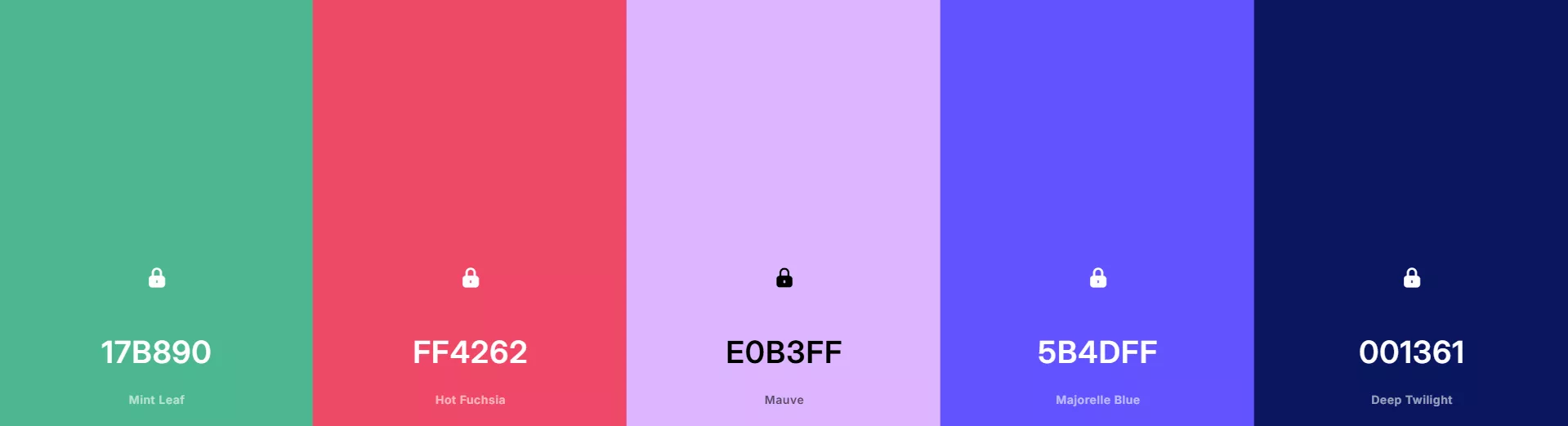
Here is a palette to get you started:
Are.na
Finding a place to collect information easily is key as a creative. This is where Are.na comes in. Described as ‘playlists, but for ideas’ or an ‘Internet memory palace’, you can collaborate with others and keep things which are important to you. It’s brilliant for gathering all your references together in one visual space, and link areas of interest to create connections between ideas.
The software is free to use, but there is an option to upgrade later down the line.
Want more articles like this?
Give this one a like
Claude
When it comes to our director, Guy, I know that he had a few options he wanted to touch on:
Picking a singular tool is hard, since my role is so diverse. I will jump from product designs to strategy to writing content. Lightroom for photography, Figma for product design (and many more!), but the tool which has crept up into my day-to-day in the last year is Claude.
Guy Armitage, Zealous Director
Claude acts as a sanity check on decisions when provided with the right data – it’s great for summarizing data into tangible observations, helping to learn new skills and keeping in check with writing. When coding, it handles the tedious plumbing and helps optimize what is being built. But mostly Guy uses it to hold a critical mirror to his creative process – speeding up warm-up time (“hey Claude, where am I in the story?”), and checking characters feel legitimate (“does this dialogue fit this character?”).
Claude is free to use with certain daily limits.
Pen and paper
This might seem a bit of a digression from the topic, but sometimes nothing beats just grabbing a pen and paper. There’s something about the tactile process that helps you connect the dots between ideas before inputting them into your digital tools. It’s a great first step in the creative process.
More interested in a move away from digital? Carmela dove deeper in to the subject of analogue here.

Bethan Jayne Goddard
Want us to write more content like this? Give it a like
Share